
What's New in XONIC 4.10
A product page that guides users step by step to the price, a new menu for cell phones and tablets, and a backend that takes some of the work off your hands. The video showcases the new features in just over three minutes.
Go directly to this section in the video:
- 0:12 Attributes
- 0:51 Mobile menu
- 1:19 Search
- 1:53 Bundle price
- 2:04 Internetmarke
- 2:44 E‑invoice/DATEV
With subtitles and chapters. AI‑generated voice.
Video transcript
0:00 · What's new in XONIC 4.10: This is what's new in XONIC 4.10: what your customers see in the shop, what saves you work in the back office and what makes life easier for your accounting.
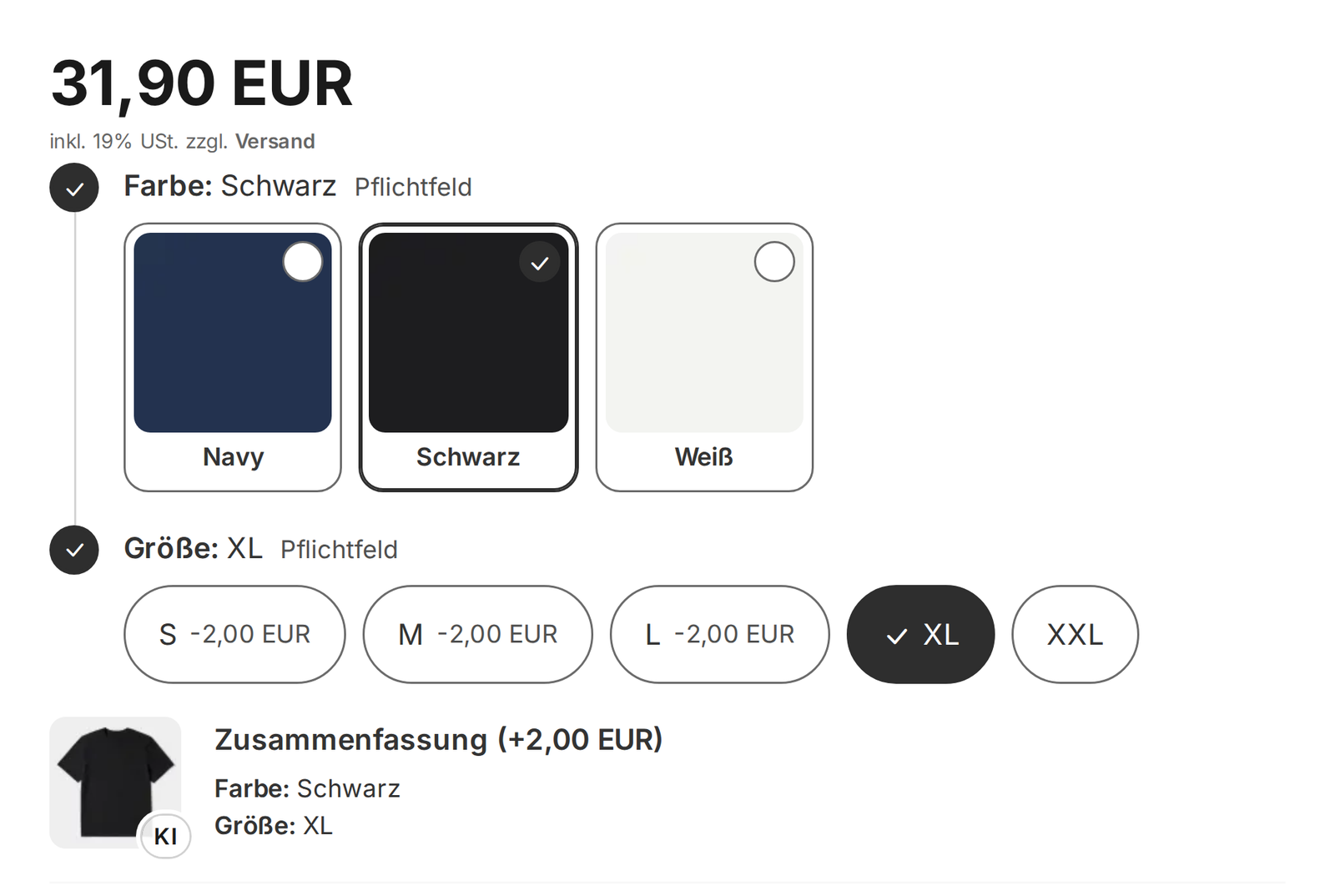
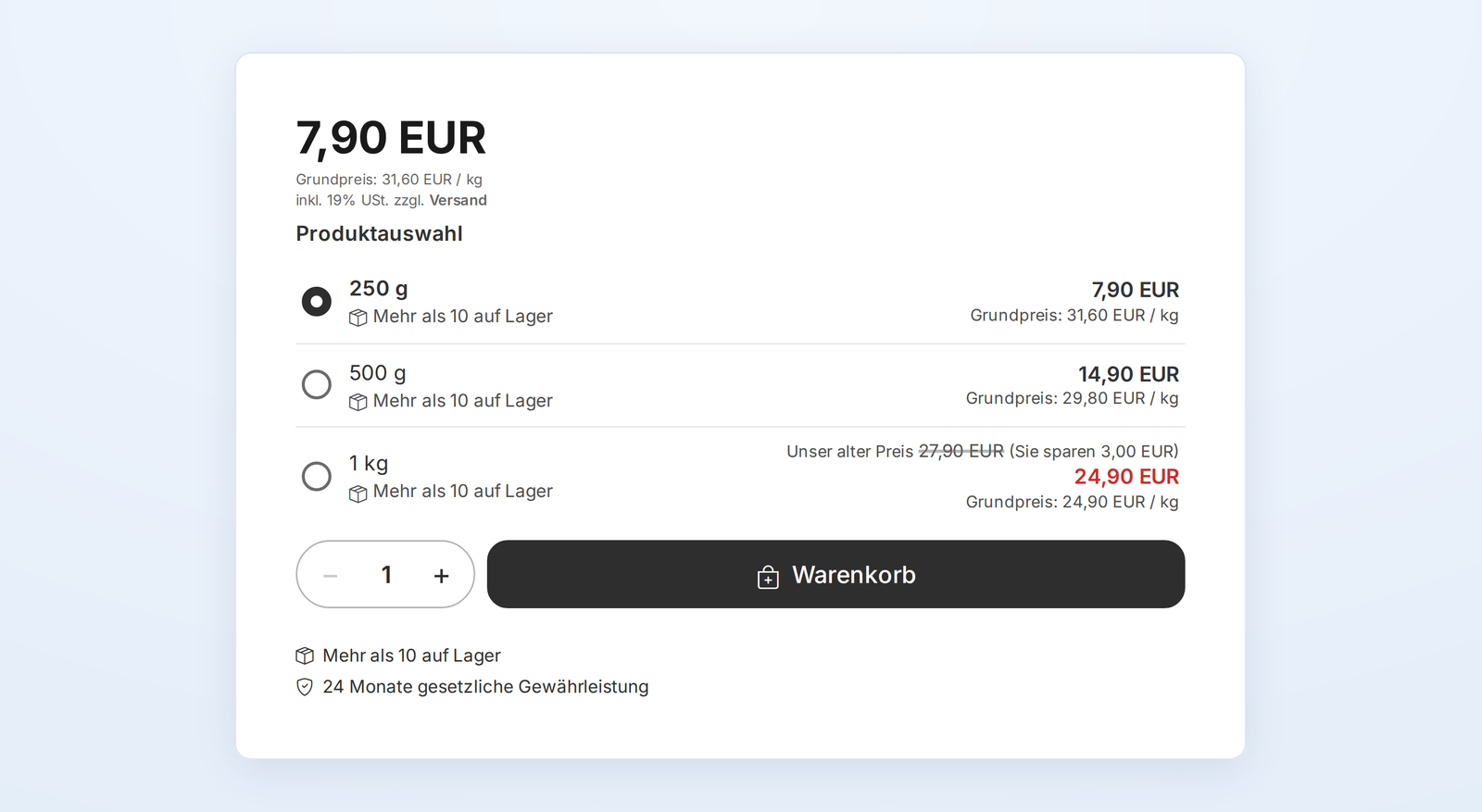
0:12 · New option selection: The product page guides your customers through every choice step by step: with the selected value, the surcharge and, at the end, a summary with image and price. Variants appear as a list, as tiles or as rows with the unit price.
0:29 · Quantity table with live total: A group order in mixed sizes? Enter the quantity for each size, the total updates as you type, tiered prices included. One click and everything is in the cart.
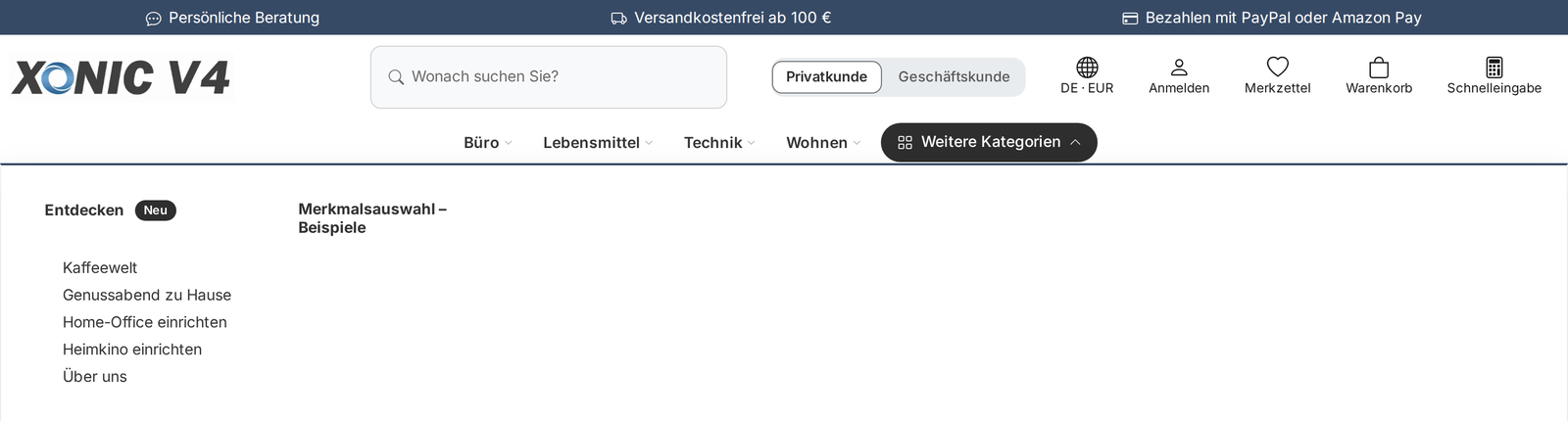
0:42 · Category navigation with highlights: A large range, clear navigation: your most important categories sit at the top, everything else is under "More categories".
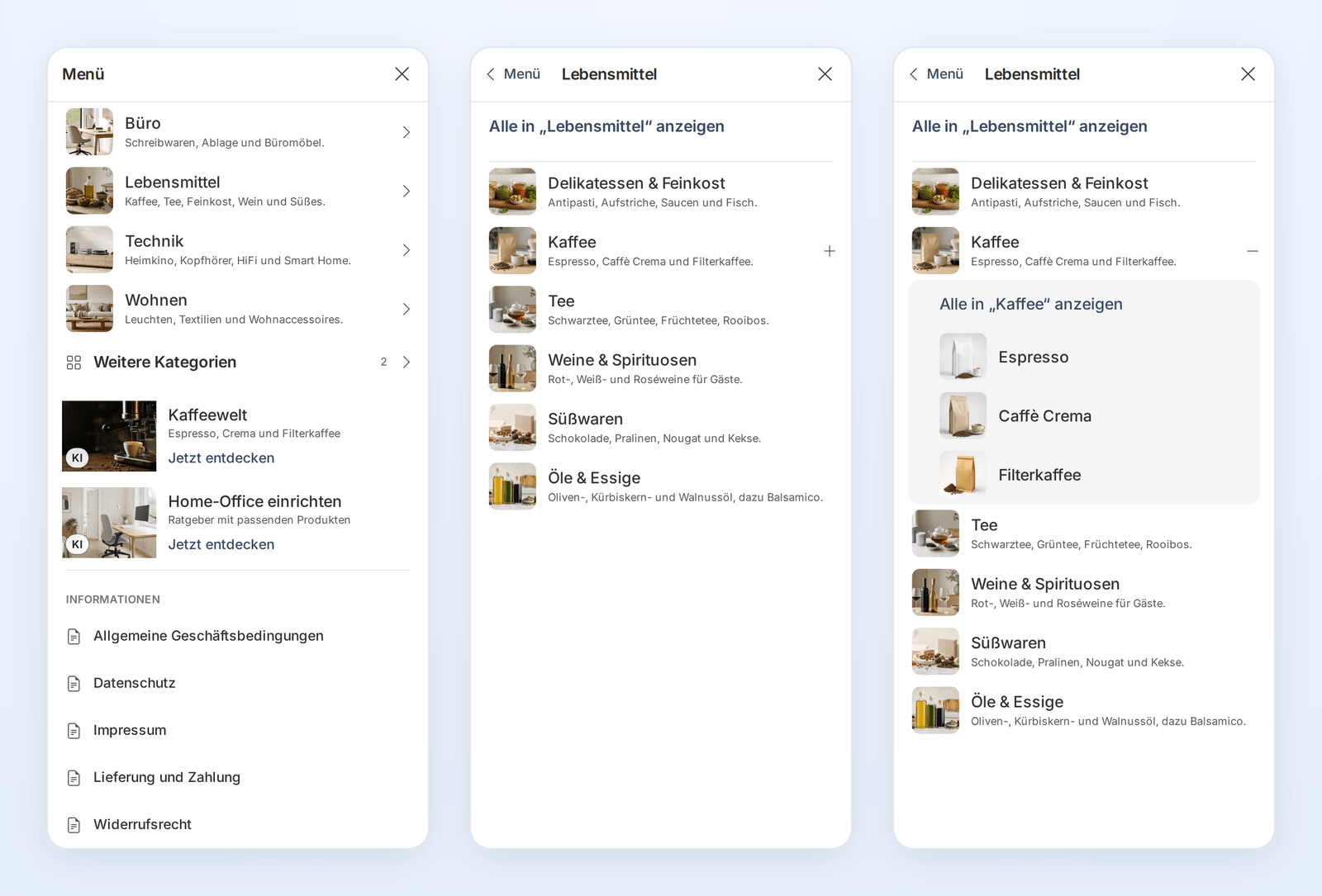
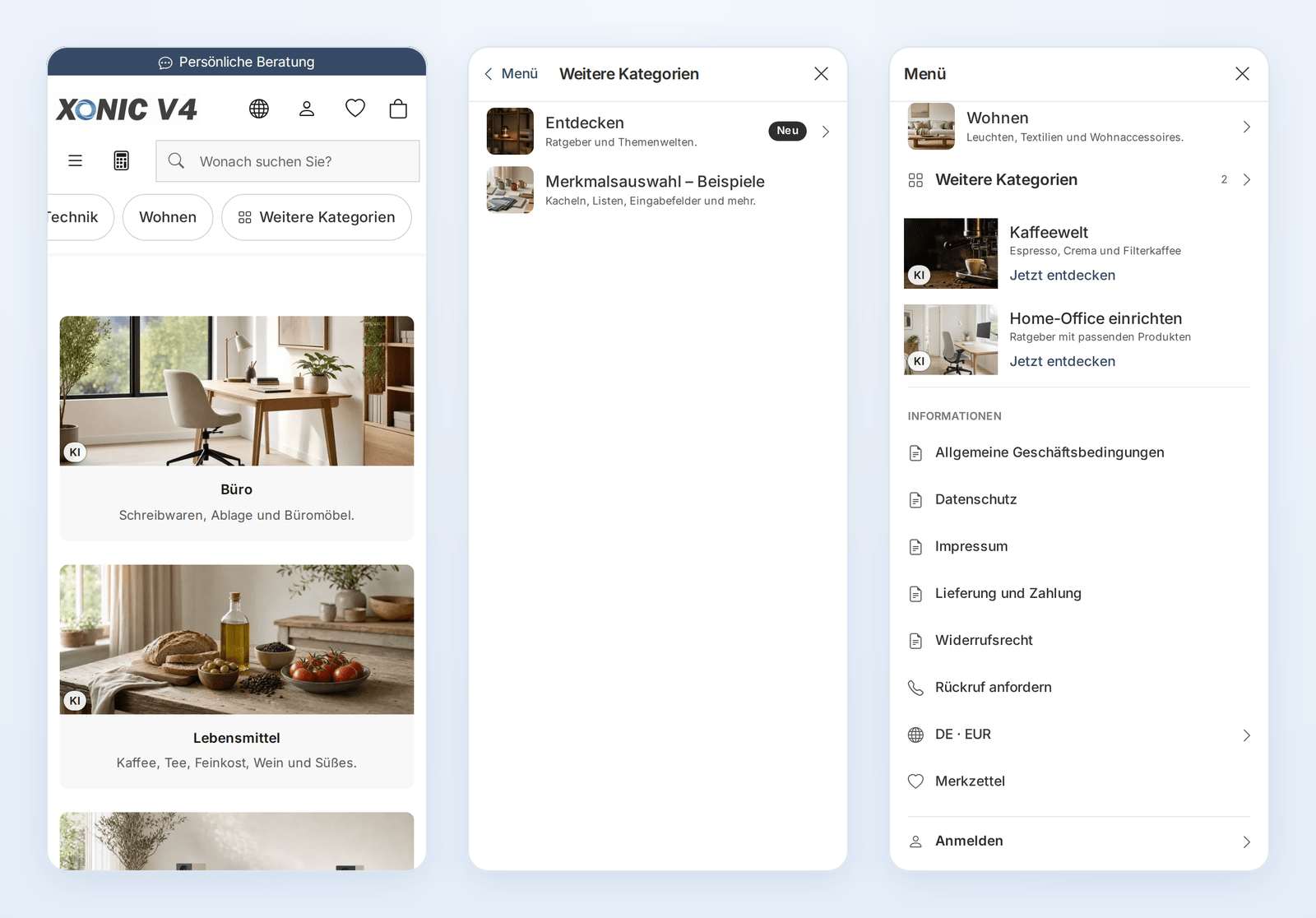
0:51 · New menu on phones: The menu on phones and tablets is brand new: customers tap through your range level by level and the header stays in place. Plus a service area and, optionally, an expandable third level, category images and promo tiles.
1:09 · Brand overview and “All brands”: Show your brands as a logo wall that evens out logos of different sizes on its own. Plus the new "All brands" page with every manufacturer.
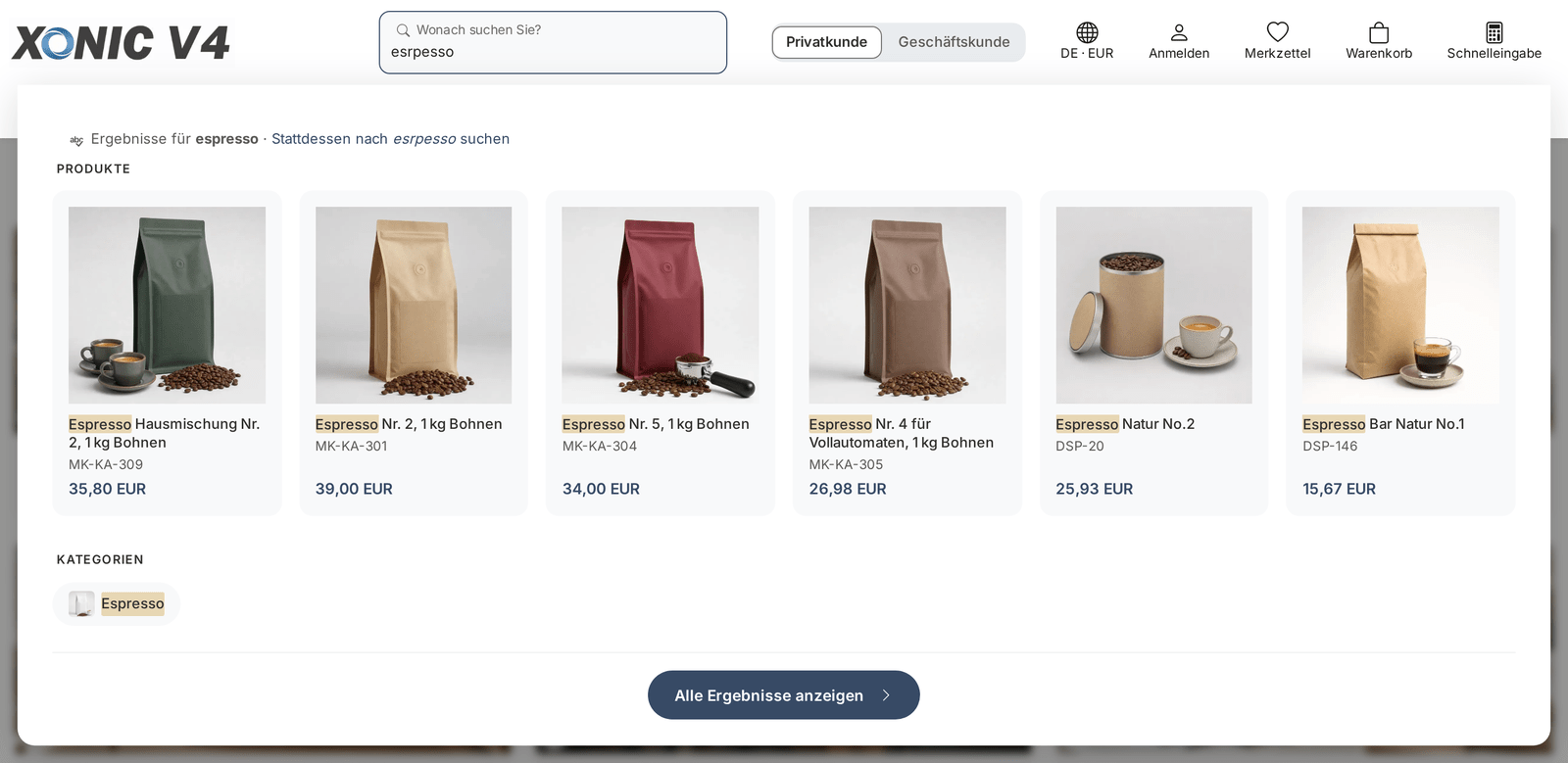
1:19 · Search: typos and search terms: One letter off? The search corrects typos on its own. And terms that used to find nothing can be pointed straight to the right product, optionally with a suggestion from the AI.
1:32 · Private and business customers: Private or business customer? One click in the shop header and prices and tax display adjust. Registration only asks for the fields that belong to the account type.
1:44 · Labelling AI images: Created an image with AI? One switch is enough and the shop labels it visibly and in a machine-readable way for search engines.
1:53 · Bundle price calculates itself: For sets, the bundle price calculates itself from the products it contains, with your markup or discount, and updates on its own after every price import.
2:04 · Internetmarke from the order: Frank letters and merchandise shipments right in the order: buy the Deutsche Post Internetmarke from your Portokasse account, print the label, done. Even for many orders at once.
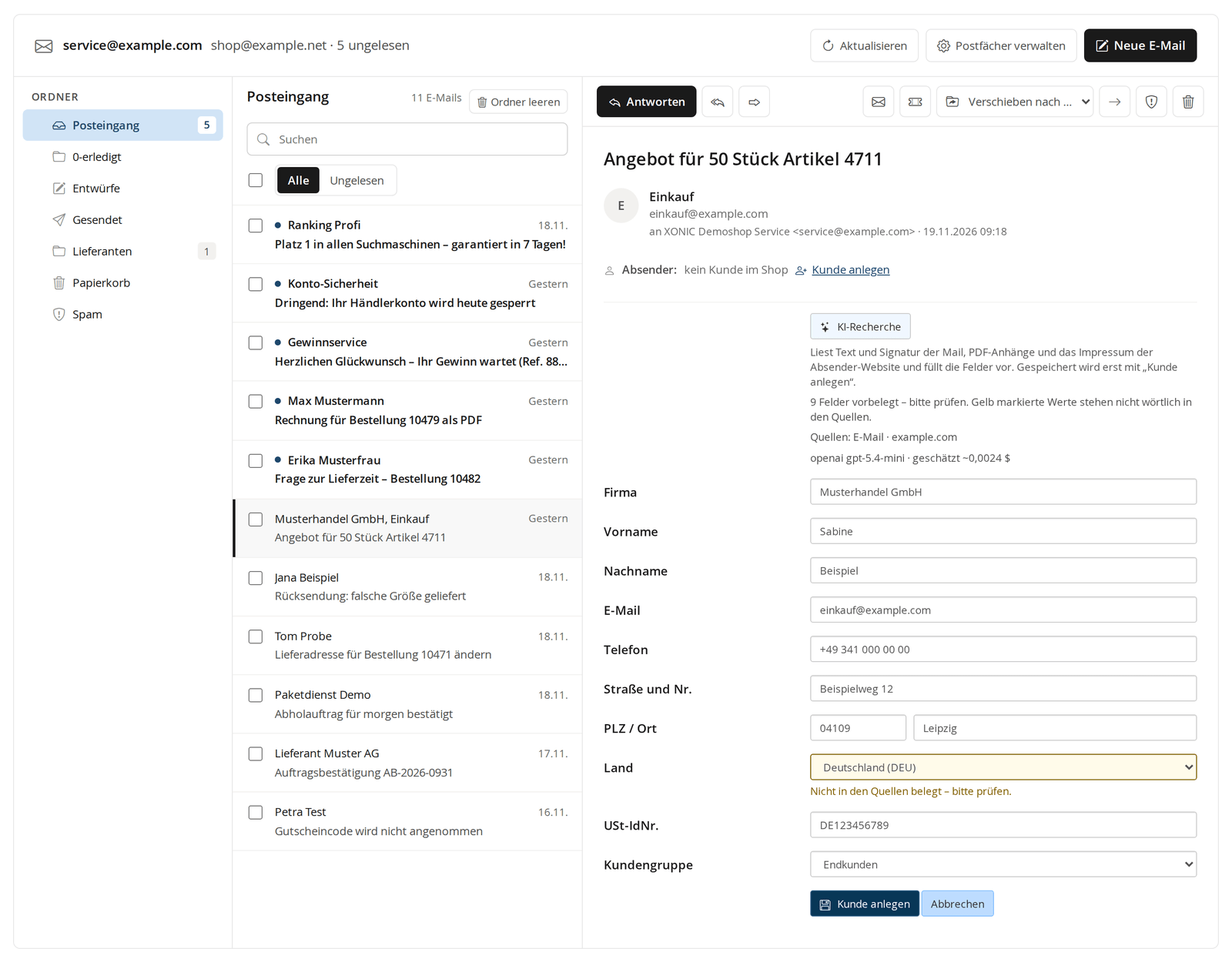
2:17 · AI in the inbox: In the xoCRM inbox, AI lends a hand: spam never becomes a ticket. And you create a new customer straight from an enquiry, the AI pre-fills company and address. Nothing is saved until you click.
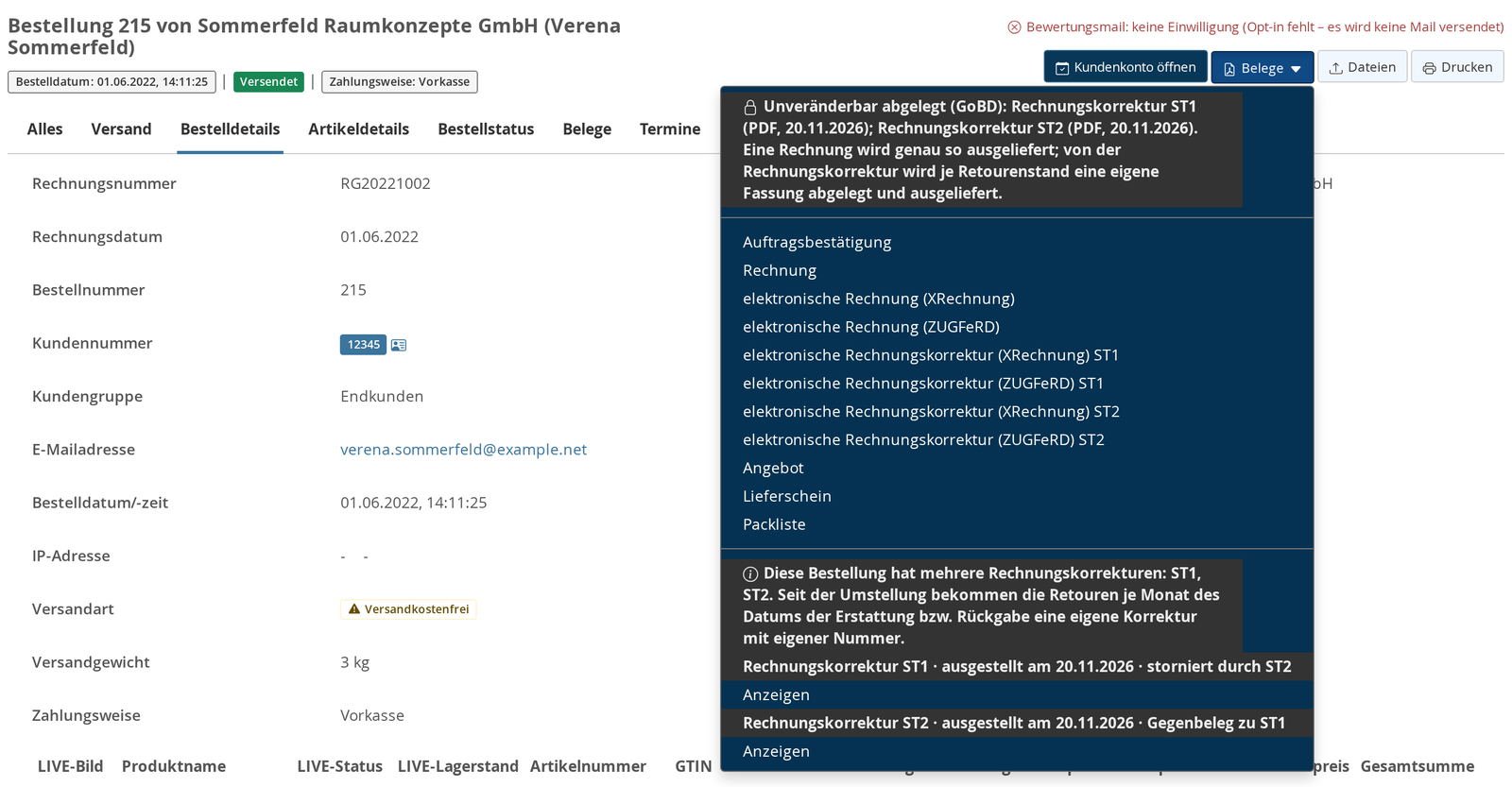
2:33 · Return with its own credit note: Returns from different months each get their own credit note. You see every document as a preview first, and you cleanly reverse a mistake with a counter-document.
2:44 · E-invoice and DATEV: Business customers receive their e-invoice automatically, without a click per order. And with the Invoice Transfer to DATEV add-on, your invoices, credit notes included, go to your tax adviser bundled by month via DATEV Rechnungsdatenservice 1.0.
3:03 · XONIC 4.10 from 2 December: XONIC 4.10 will be released on 2 December, included in all packages. You'll find every new feature in detail in the changelog at xonic-solutions.de.
For your customers in the store
Browse more clearly, find items faster, and navigate the product range more conveniently.
Included in the standard template
New attribute selection on the product page
Each selection is clearly presented, step by step, all the way to the price.
All attribute types appear in the same uncluttered view, with the selected value and a separate surcharge. Attributes that build on one another lead step by step, with check marks, to a summary with an image and price.
The purchase box displays variants as rows with base prices, and the order table lists quantities per row with a running total.
Watch the feature video · 5:04 min: New attribute selection
With subtitles and chapters · AI‑generated voice
Included in the standard template
New menu for smartphones and tablets
Navigate the product range level by level, with a fixed header.
Your customers navigate through your product range level by level, while the header bar—showing the path back—remains visible. Optional category images and promotional tiles; at the bottom, a service area combines callback, wish list, and customer account features.
Watch the feature video · 4:54 min: New menu on phones
With subtitles and chapters · AI‑generated voice Guide: Category Navigation – left-hand menu
Can be enabled in existing stores
Menu bar with highlights and “More Categories”
Large product ranges remain easy to navigate.
The menu bar displays only your most important categories; “More Categories” collects all others in a panel. On a smartphone, a swipeable bar below the header shows the same entries.
Watch the feature video · 4:54 min: Category navigation with highlights
With subtitles and chapters · AI‑generated voice Guide: Category Navigation
Correctionfeature can be enabled; AI costs are determined by the provider
Search works even with typos
Fewer searches with no results, more items found.
If a letter is missing, extra, or out of order, the store searches for the correct word. You can specifically assign terms with no matches to a product, category, or brand—optionally using AI suggestions.
Your AI provider charges separate fees for the AI suggestions.
Watch the feature video · 5:08 min: Search: typos and search terms
With subtitles and chapters · AI‑generated voice Guide: Search the Store
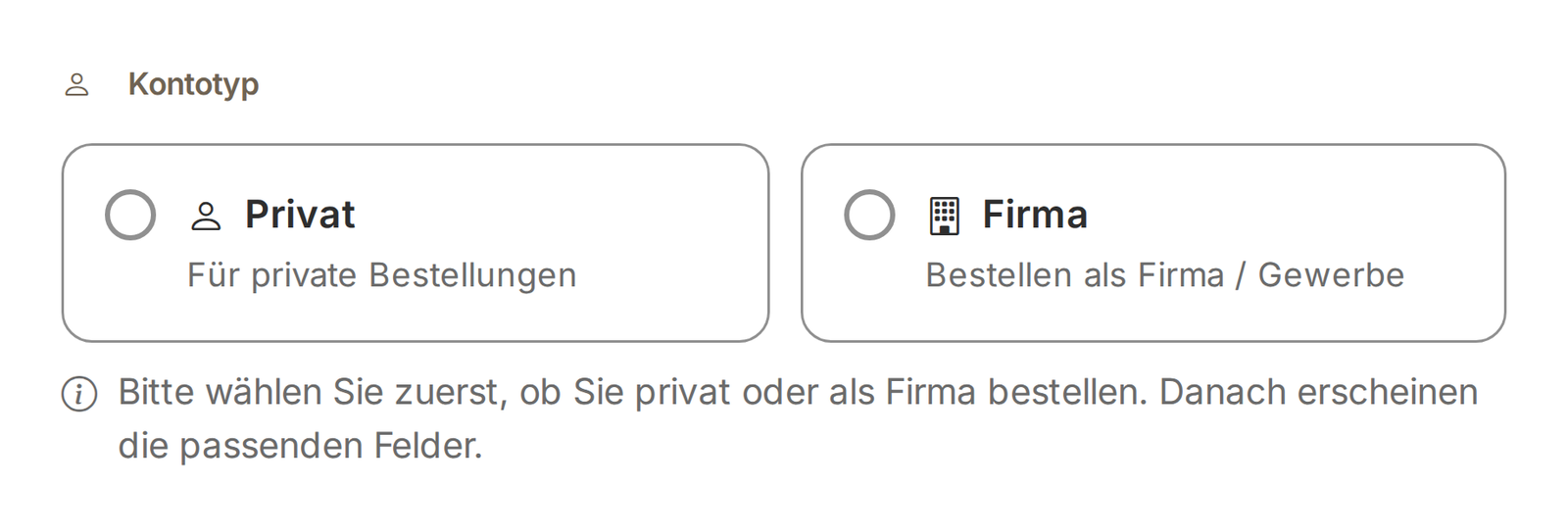
Separate private and business customers
Can be enabled
One click in the header adjusts prices and tax information. The registration process first asks, “Personal or business?” and displays only the relevant fields.
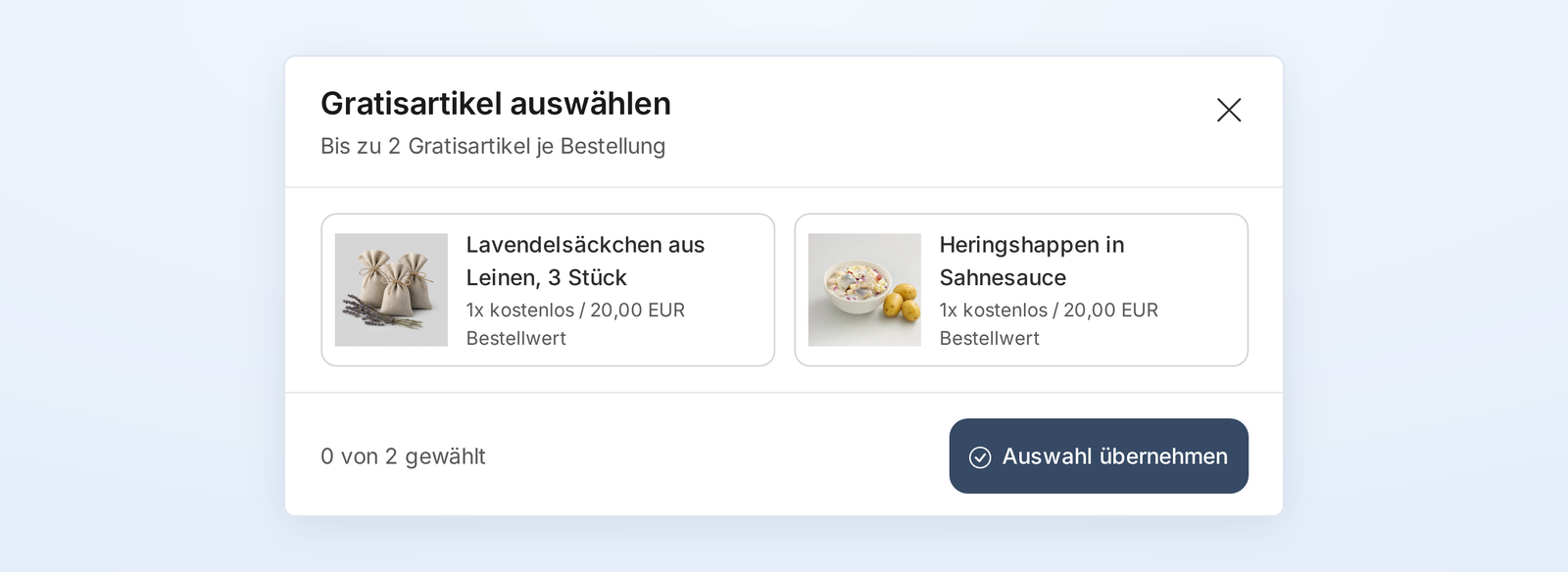
Free samples via chat
Can be enabled
“Select Now” above the shopping cart opens a dialog with free items to check off, including the number of available samples and the remaining balance.
For Your Day-to-Day Work in the Backend
Fewer steps for handling inquiries, prices, and shipping.
XONIC PremiumxoCRMKI costs from the provider
AI in Your Inbox: Spam and New Customers
Spam isn’t even converted into a ticket; the AI automatically populates new customer information.
The “Mail to Ticket” feature optionally checks incoming emails using AI and moves spam to the spam folder. When you create a new customer from an inquiry, an AI search pre-fills the company name, address, and VAT ID; the information is saved only after you click.
Your AI provider charges its own fees for the AI.
The bundle price calculates itself
Licenses per bundle
The price per customer group is determined by the included products—with optional percentage markups or discounts—and adjusts automatically after imports.
Stamps directly from the order
Setup by XONIC
Purchase Internetmarke stamps from your Deutsche Post postage account—individually or in bulk for multiple orders at once—printed as labels or on A4 paper.
In the changelog:Tickets and mailboxItemsShipping
For your accounting
Receipts that remain exactly as issued, e-invoices for business customers, and—with the add-on module—transfer via the DATEV Rechnungsdatenservice 1.0 to your tax advisor.
Filing for newreceipts; corrections for returns: optional
Documents remain exactly as they were issued
Archived upon initial issuance; separate correction for each return month.
The store files invoices, credit memos, corrections, and e-invoices upon initial issuance and subsequently outputs exactly this same file everywhere, even if the order, company data, or template changes later.
Returns from different months each receive their own invoice correction with a unique number. You should first review each one as a preview; if one is incorrect, you can reverse it with a counter-document.
This filing system applies to documents starting with this update. New shops will start using the per-return correction feature right away; we’ll convert existing shops upon your request.
Watch the feature video · 7:32 min: Returns and invoice corrections
With subtitles and chapters · AI‑generated voice Guide: Returns & Exchanges
DATEV Rechnungsdatenservice 1.0 per month
Add-on module
Outgoing invoices, along with PDFs, are bundled and sent to DATEV Unternehmen online each accounting month for further processing by your tax firm—either with the click of a button or as part of the daily batch.
DATEV Rechnungsdatenservice 1.0: Invoice Transfer to DATEV, available as an add-on to any package. It optionally transfers invoice corrections as well, processed on a per-return and per-month basis. The must be ordered from DATEV and set up before use.
Automatic e-invoicing to business customers
New Stores: By Default; Existing Stores: Migration with Verification
If an invoice exceeding €250 is sent to a domestic business, the store automatically includes the e-invoice, even in status emails and for contract invoices. As a ZUGFeRD invoice, the e-invoice replaces the PDF invoice.
For existing shops, the update will convert them to ZUGFeRD under certain conditions (see “Important for Existing Shops”); otherwise, you’ll need to enable the automatic feature yourself.
Also new
A selection of 255 new features, fixes, and improvements.
- “Recently Ordered” with preview image
- Brand overview and “All Brands” page
- Mark AI images with a toggle
- Refunds from orders via PayPal Checkout and Datatrans Payment Page
- Submit new and updated pages to Bing and other search engines via IndexNow (can be enabled)
- Scan barcodes with the camera for Quick Buy and Quick Entry (must be enabled by XONIC Support)
Important for existing stores
- In the store: New attribute selection and side menu (can be reset) in the default template; content blocks feature a new design; custom templates remain.
- In the backend: only the new ticket interface is available now, along with a new order history; the store saves new invoices and issues exactly this version.
- E-invoicing: Switched to ZUGFeRD once, provided the requirements are met (see below); otherwise, it can be turned off and on.
- Old payment methods: “Datatrans” (continues to use the “Datatrans Payment Page”) and “Worldpay” are no longer supported; switch over beforehand. Older UNZER module: Update during a quiet time, then check paid orders.
- Background services: require a scheduled task; we’ll set them up on our servers during the update.
- Disabled by default: many other new features; can be enabled as needed. When we install the update, we’ll check your customizations beforehand.
E-Invoice: All Prerequisites
The update will convert your store to ZUGFeRD once, provided all of the following apply:
- Shop located in Germany, not a small business
- The “Automatically enable e-invoicing for businesses” setting has never been saved (remains unchanged at “off”)
- A VAT ID or tax ID is entered in the “Your Company’s Tax ID” field; if a tax ID is used, the commercial register number must also be entered in the separate “Your Company’s Commercial Register Number” field
- E-invoices are not already attached to every order confirmation, not even for a single store domain
In emails containing invoices totaling over 250 € gross sent to domestic business customers, ZUGFeRD will then replace the PDF invoice. Otherwise, the automatic feature remains disabled and can be enabled.
How to get XONIC 4.10
The easiest way to request the update is via a support ticket. If you’d like, we can install it for you as part of our support services and coordinate a time with you. Like every update, version 4.10 is included in all packages.
Frequently Asked Questions About XONIC 4.10
When can I use XONIC 4.10 in my store?
Version 4.10 will be released on December 2, 2026. Starting then, you can request the update by submitting a ticket. If we install it for you, we’ll coordinate the schedule with you and review any customizations in your store beforehand.
Will my store change automatically after the update?
Yes, among other things: In the standard template, the attribute selection and side menu will have a new look; in the backend, the ticket interface and order history will be updated; and for existing stores in Germany, the update will switch them to automatic e-invoicing (ZUGFeRD) under certain conditions. Many other features, such as typo correction in the search function, are disabled by default in existing stores. All these points are listed in the “Important for Existing Stores” box and in the changelog under “Important for Existing Customers.”
Does the update cost anything?
Like every update, version 4.10 is included in all packages. Shops using XONIC Premium modules can access their respective features, and your AI provider will charge its own fees for AI features.
Where can I find all the changes in detail?
The changelog for XONIC 4.10 under “Versions & Updates” lists all new features, improvements, and fixes, organized by category, with videos available for many features.


